Boost the Power of Your Amazon Alexa Devices
For many years, I’ve had several Amazon Alexa devices at home and have grown used to relying on them daily. Unfortunately, it feels like the development of their software more or less stalled around 2018. Amazon is currently working on a new version, Alexa+, but the rollout has been very slow, performance and stability can still be problematic, and overall I’m not yet convinced it’s ready as a polished final product.
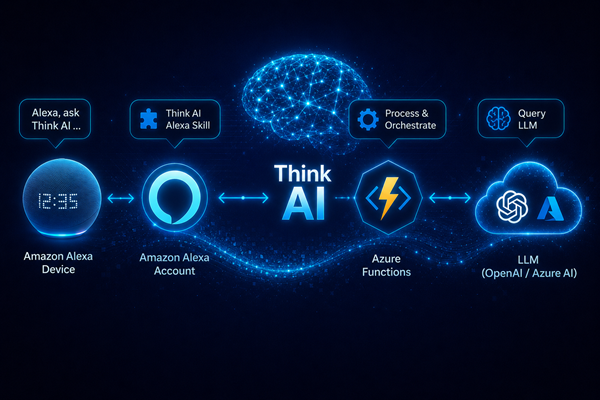
Out of curiosity, I decided to see whether it would be possible to create a custom skill that I could easily install on my own devices and connect to my personal LLM instances. With the help of AI, it turned out to be surprisingly simple — especially if you already have some programming experience — so I decided to share this straightforward solution with you.
Because of OpenAI token costs, I’m not making my skill publicly available for installation on external devices. Instead, I keep it limited to my own environment. However, you can follow the same steps to locally install and configure a similar solution using your own OpenAI or Azure account.
The idea is simple: you install a lightweight custom skill in your Amazon Alexa account. That skill connects to an Azure Function, which then calls a selected LLM to generate an answer to the user’s question and returns the response back to Alexa.
There are simpler solutions available online where the skill contains a hardcoded OpenAI API key and directly references a specific model. I wanted to separate these layers instead.
What initially seemed like a trivial task ended up taking me several hours because of one surprisingly frustrating issue. That’s why, below, I’ll walk through the implementation step by step and point out the critical part that caused the problem.